Call Claude as an agent, with no API key
An agent enrolled with cilock enroll agent already has an identity on the TestifySec Platform: a SPIFFE ID of the
form spiffe://platform.testifysec.com/tenant/<tenant-id>/agent/<agent-id>. This guide lets that identity call the
Claude API directly. The platform mints a short-lived token naming the agent, and Anthropic exchanges it for a
Claude access token through workload identity federation
(WIF). There's no Anthropic API key to store, rotate or leak.
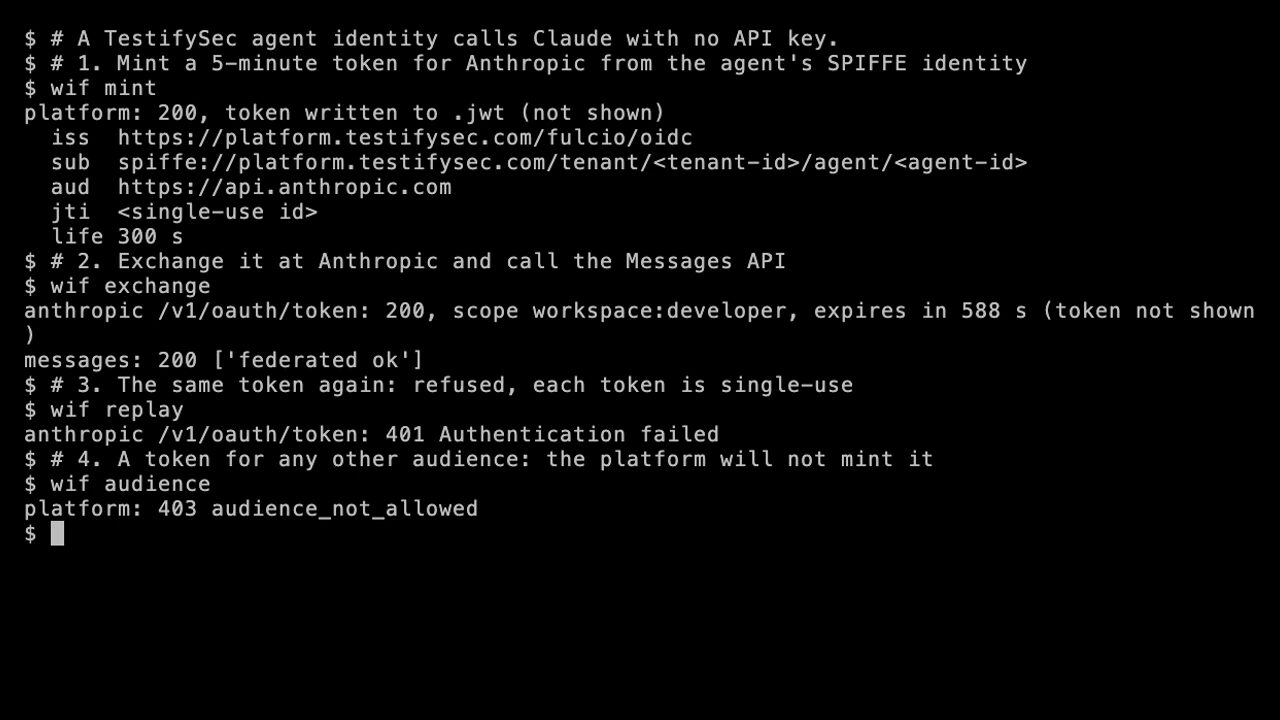
One minute, no narration. Every ID is redacted on screen. Play the video.
How it fits together
| Step | Who | What |
|---|---|---|
| 1 | Agent | Sends its stored refresh credential to POST /api/agent/federation-token with audience: https://api.anthropic.com. |
| 2 | Platform | Returns an ES256 JWT, valid for 300 seconds. iss is https://platform.testifysec.com/fulcio/oidc, sub is the agent's SPIFFE ID, and it carries a jti. |
| 3 | Agent | Presents the JWT to Anthropic's POST /v1/oauth/token (RFC 7523 jwt-bearer grant). |
| 4 | Anthropic | Checks the signature against the platform's published keys, matches your federation rule, and returns an access token for the service account. |
The platform mints a federation token only for audiences on its allowlist, and https://api.anthropic.com is one of
them. A request for any other audience is refused before the credential is checked.
What you need
- An agent enrolled on the platform with
cilock enroll agent(see the CLI reference). The command stores the agent's refresh credential0600in CI/lock's agent store. - A Claude Console organization where you can create federation issuers, rules and service accounts.
- Your platform tenant ID. It's the
<tenant-id>segment of the agent's SPIFFE ID.
Federation authenticates a Console service account and bills the workspace the rule names. It does not sign in to a Claude Pro or Max subscription, so subscription usage can't be federated.
Step 1: Register the issuer
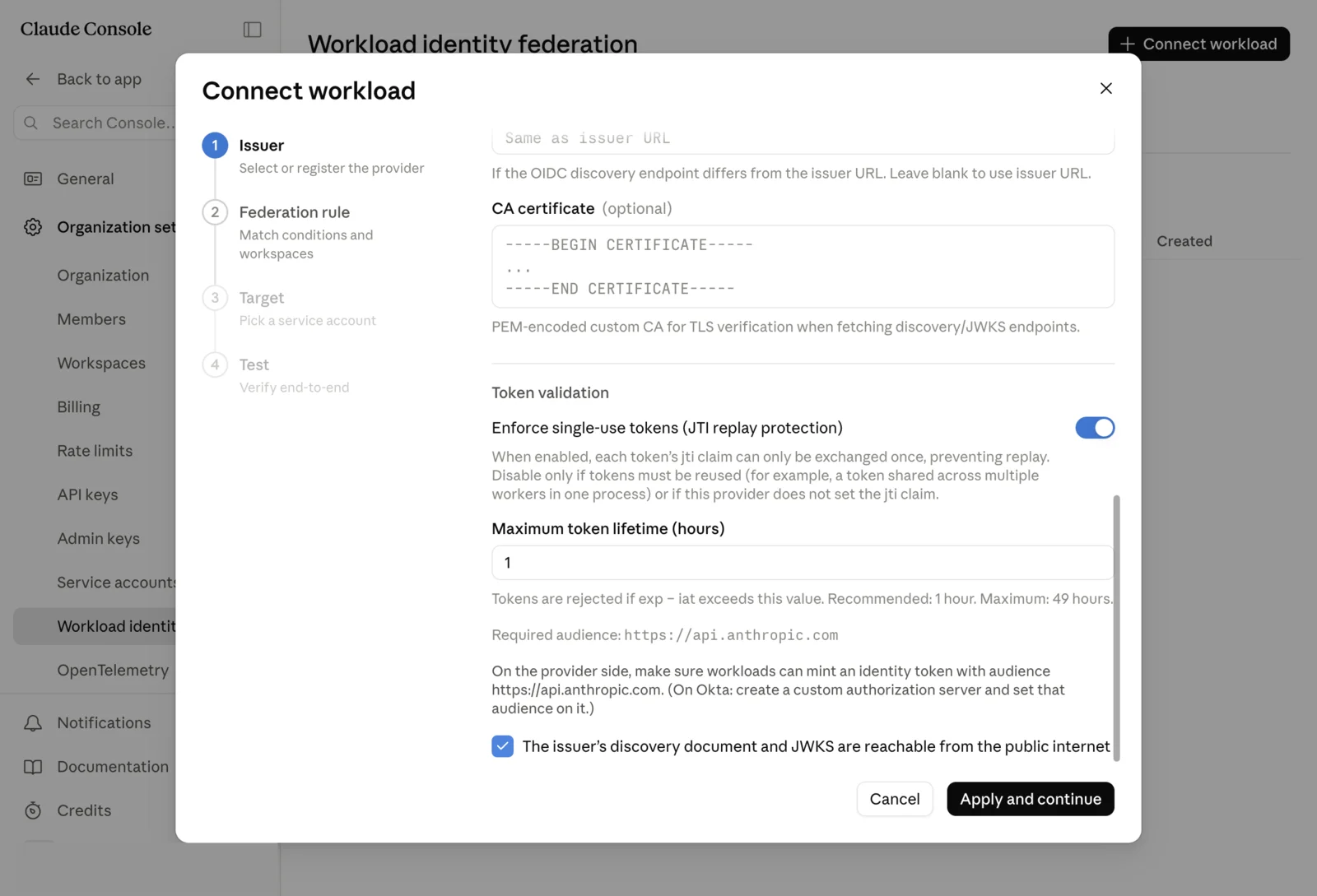
In the Claude Console, open Settings → Workload identity and choose Connect workload. Register an issuer with:
- Issuer URL:
https://platform.testifysec.com/fulcio/oidc. The platform serves its discovery document and JWKS publicly, so leave the discovery endpoint blank. - Enforce single-use tokens (JTI replay protection): on. Every platform token carries a
jti. - Maximum token lifetime: 1 hour is fine. Platform tokens live 300 seconds.
Step 2: Write the federation rule
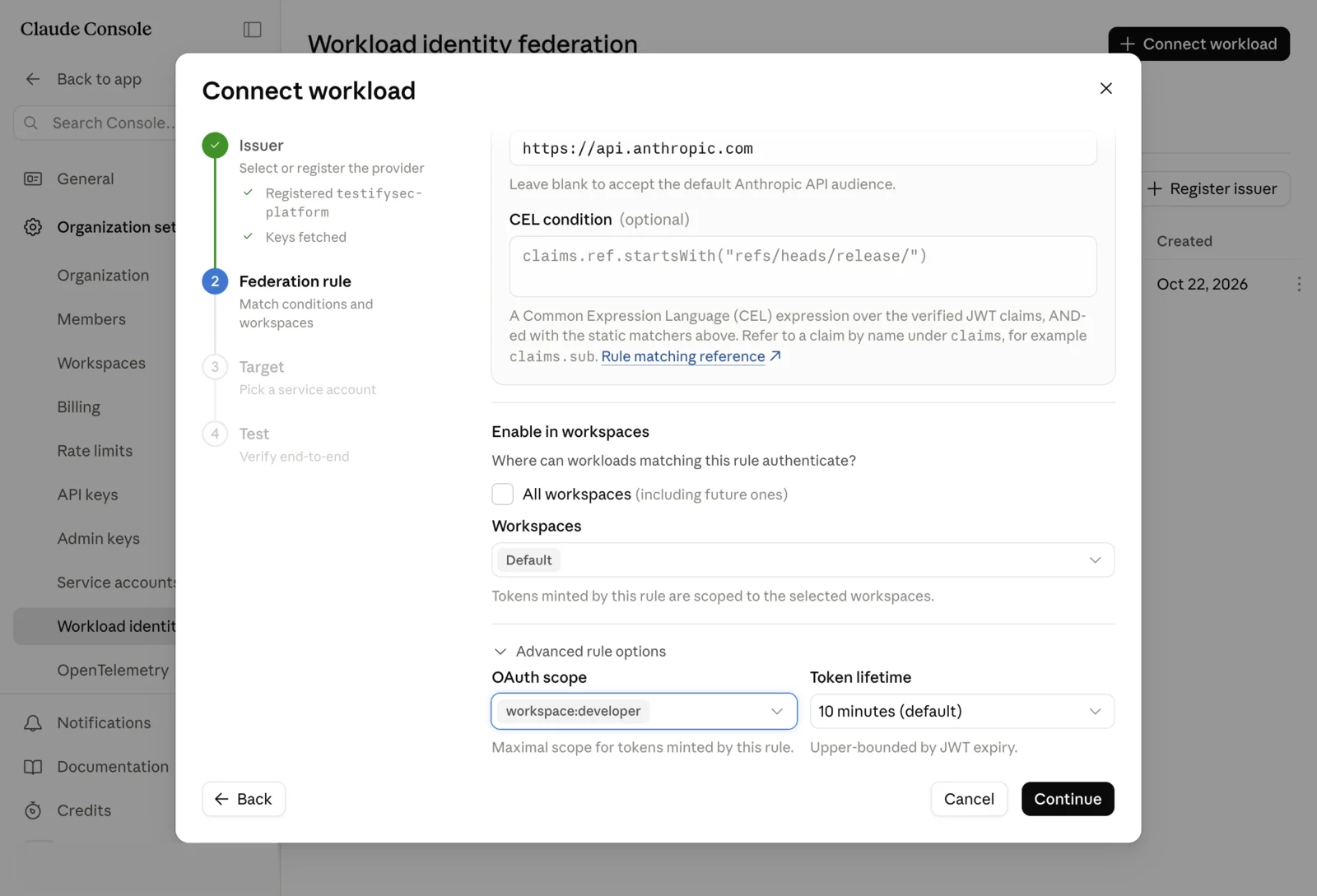
The rule decides which tokens from that issuer are accepted. It needs both of these:
- Subject prefix:
spiffe://platform.testifysec.com/tenant/<tenant-id>/agent/*for every agent in your tenant, or one exact SPIFFE ID for a single agent. - Audience:
https://api.anthropic.com.
A rule on the subject alone would accept other tenants' agents if the prefix were too loose, and a rule without the
audience would accept platform tokens minted for other relying parties. Pick the workspace the tokens should bill to
and an OAuth scope: workspace:inference if the agent only calls Claude, workspace:developer if it also needs
Files, Skills or Managed Agents.
Step 3: Pick the service account
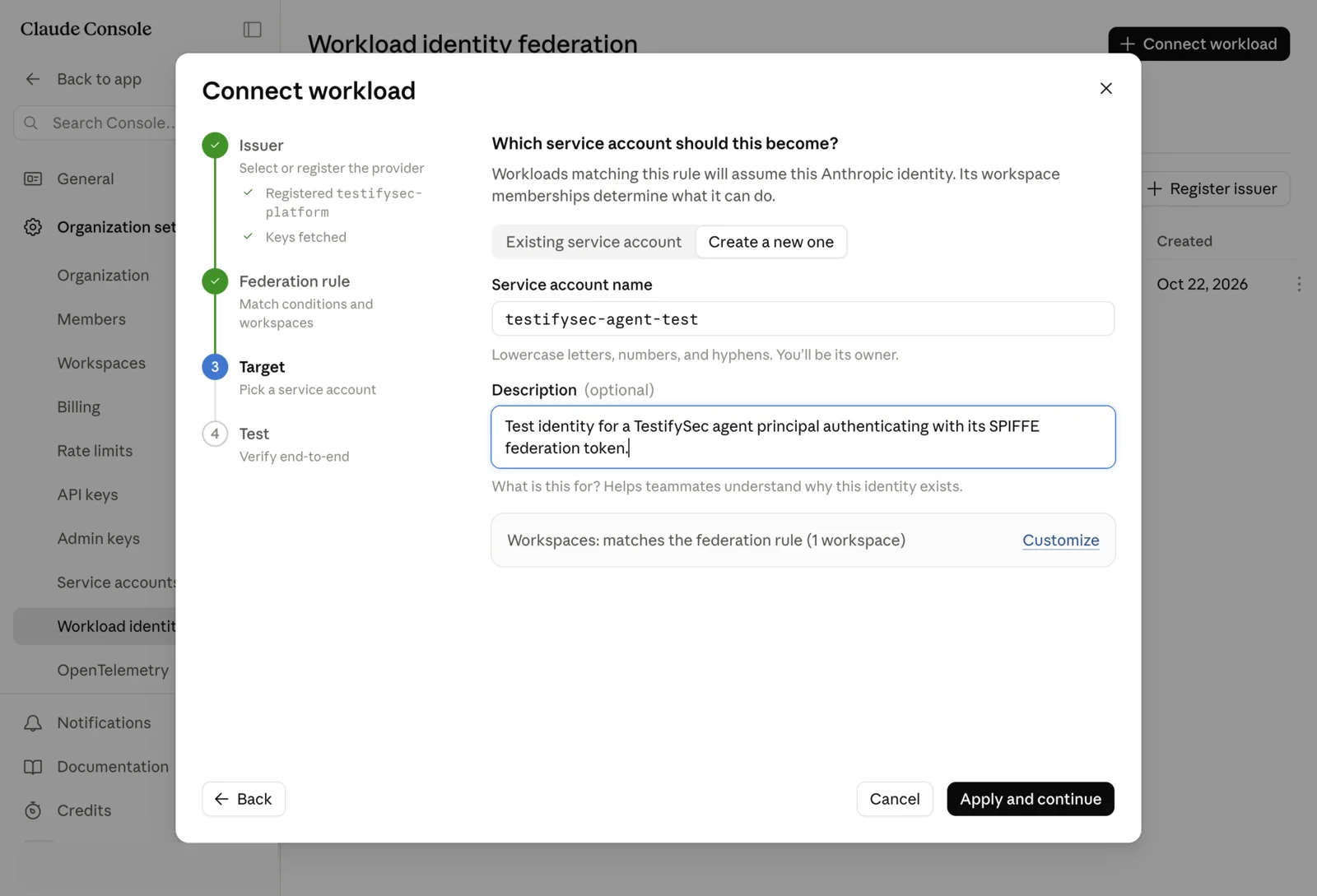
The service account is the Anthropic identity the agent acts as. Create one for agents (names are lowercase letters, digits and hyphens) and make sure it's a member of the rule's workspace.
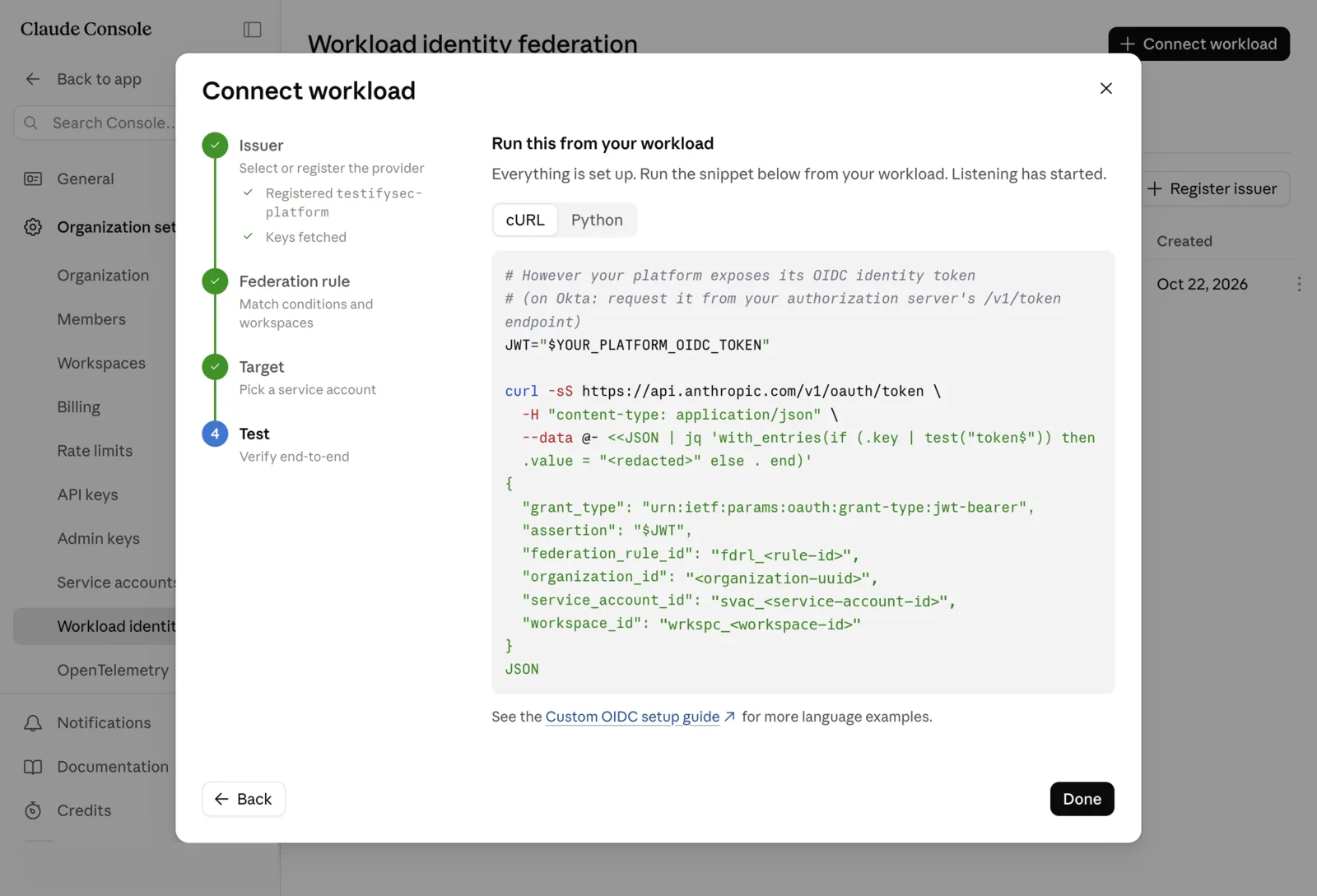
The last page of the wizard shows a test snippet with your four IDs: the federation rule (fdrl_…), organization,
service account (svac_…) and workspace (wrkspc_…). Keep them. They aren't secrets.
Step 4: Mint a token on the agent's machine
CI/lock keeps the agent credential in agent-credentials.json under its state directory: $CILOCK_STATE_DIR when
set, otherwise ~/Library/Application Support/cilock on macOS and ~/.config/cilock on Linux. This pipes the
credential straight from the store into the request body, so it never appears on a command line. It mints into a
private temporary file and replaces the live token file only when a well-formed token came back, so a reader never
sees an empty or half-written file and a failed mint leaves the previous token in place:
store="$HOME/Library/Application Support/cilock/agent-credentials.json"   # Linux: ~/.config/cilock/...
token_file="$HOME/.cache/anthropic-wif/token"
mkdir -p "$(dirname "$token_file")" && chmod 700 "$(dirname "$token_file")"
umask 077
tmp=$(mktemp "$token_file.XXXXXX")
if jq '.agents["https://platform.testifysec.com"]
       | {tenant_id, agent_id, refresh_credential, audience: "https://api.anthropic.com"}' "$store" \
   | curl -sS --fail-with-body -X POST https://platform.testifysec.com/api/agent/federation-token \
       -H 'content-type: application/json' --data @- \
   | jq -er '.token | select(test("^[A-Za-z0-9_-]+\\.[A-Za-z0-9_-]+\\.[A-Za-z0-9_-]+$"))' > "$tmp"; then
  mv -f "$tmp" "$token_file"      # rename in the same directory: readers see the old file or the new one
else
  rm -f "$tmp"; echo "mint failed; kept the previous token" >&2
fi
The last jq -e decides the if: it exits non-zero on an empty answer, an error body, an empty token or anything
that isn't JSON, so the live file is only replaced by a real token, with or without pipefail. The token is good for
300 seconds and for one exchange. Mint a new one for every exchange.
Step 5: Call Claude
With the SDKs or the API
Anthropic's SDKs read these variables and do the exchange themselves (WIF reference):
export ANTHROPIC_FEDERATION_RULE_ID=fdrl_<rule-id>
export ANTHROPIC_ORGANIZATION_ID=<organization-uuid>
export ANTHROPIC_SERVICE_ACCOUNT_ID=svac_<service-account-id>
export ANTHROPIC_WORKSPACE_ID=wrkspc_<workspace-id>
export ANTHROPIC_IDENTITY_TOKEN_FILE="$HOME/.cache/anthropic-wif/token"
Anthropic's reference says the SDK "re-reads this file on every exchange", so keep the file fresh: re-run Step 4 on a timer shorter than five minutes for a long-running process.
The raw exchange, if you'd rather see it:
jq -n --rawfile jwt "$token_file" '{
  grant_type: "urn:ietf:params:oauth:grant-type:jwt-bearer",
  assertion: ($jwt | rtrimstr("\n")),
  federation_rule_id: env.ANTHROPIC_FEDERATION_RULE_ID,
  organization_id: env.ANTHROPIC_ORGANIZATION_ID,
  service_account_id: env.ANTHROPIC_SERVICE_ACCOUNT_ID,
  workspace_id: env.ANTHROPIC_WORKSPACE_ID }' \
| curl -sS -X POST https://api.anthropic.com/v1/oauth/token \
    -H 'content-type: application/json' --data @- \
| jq '{scope, expires_in}'
A success returns the granted scope and an access token of about ten minutes, which you send as
Authorization: Bearer <token>.
With Claude Code
Claude Code reads the same variables. With the five variables above set, run it as usual:
unset ANTHROPIC_API_KEY ANTHROPIC_AUTH_TOKEN CLAUDE_CODE_OAUTH_TOKEN ANTHROPIC_PROFILE
claude -p "Reply with exactly: federated ok"
We tested this with Claude Code 2.1.308 using a fresh CLAUDE_CONFIG_DIR with no login in it, so federation was the
only credential. Claude Code ranks federation variables
above a /login but below ANTHROPIC_API_KEY, ANTHROPIC_AUTH_TOKEN, apiKeyHelper and CLAUDE_CODE_OAUTH_TOKEN,
which is why the unset matters. /status shows a Profile row when federation is the credential in use. We checked
a single claude -p run; for an interactive session longer than the access token, keep refreshing the token file
as above.
Troubleshooting
| Symptom | Cause | Fix |
|---|---|---|
403 audience_not_allowed from the platform | The audience you asked for isn't on the platform's allowlist. | Use exactly https://api.anthropic.com. |
401 from the platform | The agent credential is missing, expired or revoked. Agent identities are time-bound. | Enroll again with cilock enroll agent. |
401 Authentication failed from Anthropic on a second try | The same token was exchanged twice. Each jti is accepted once. | Mint a fresh token for every exchange. |
401 Authentication failed from Anthropic on the first try | The rule didn't match: wrong subject prefix, missing audience, or the token expired. | Anthropic's response is deliberately opaque. Open the authentication history in the Console, which names the failed check. |
| An error that names something other than Anthropic | ANTHROPIC_BASE_URL points at a proxy, and the exchange went there. | Unset it, or make sure the proxy forwards /v1/oauth/token. |
| Claude Code still uses your own login or key | A higher-precedence credential is set. | Unset the variables in the claude example above. Check /status. |